mayo 14, 2014

5 Tips for Taking Panoramic Photos With Your Smartphone

Panoramic images of stunning landscapes almost always look marvellous, but they can be extremely difficult to create. Using a smartphone, however, there are various techniques and tricks – not to mention apps – which you can employ to get the best results.

Lighting and Shape

In standard photos, you should be able to position yourself to take advantage of the best light source and let your camera do the rest.
With panoramic photography, the light changes with each composite snap, especially if you’re indoors. The shape of the scene will also play an important factor in this, as well as any walls and fabrics that are present. Light will diffuse across softer materials and bounce off walls and floors, causing considerable problems with the picture.
muo smartphone panorama light   5 Tips for Taking Panoramic Photos With Your Smartphone

Even outdoors can be difficult. The snap above has a striping effect there the photos were matched up by the software. Why are they darker at one end? Difficult to say as it was years since they were taken. However, a finger casting a shadow over the lens can cause this problem, as can a sky with lots of clouds rapidly passing in front of the sun.
For the best, most consistent results, avoid taking panoramic photos with your smartphone if you’re indoors unless you have control over the lighting and/or you are looking for a particular effect or atmosphere that can only be attained by confused lighting. Also, keep your fingers out of the way.

Avoid Movement Where Possible

muo smartphone panorama car   5 Tips for Taking Panoramic Photos With Your Smartphone

Photographing groups of people is difficult at the best of times – it’s even tougher when you’re creating panoramic photos, as people (and vehicles) tend to move. The example above (created several years ago on an old HTC Touch Pro) demonstrates the risks perfectly: the car on the right is also seen just left of centre!
As such, panoramic photos should avoid including anything that moves rapidly, so if you plan to photograph a group of people they’re all going to have to be extremely well behaved and aware of what you’re trying to achieve for it to work. Taking a few test shots might be a good idea so you have something to paper over any cracks with later on.
If weather conditions are bad, you’ll also encounter problems with a panoramic photo, whether you’re snapping a landscape or a group photo. Wind and rain can cause problems with matching up the subsequent shots, and as such these conditions are best avoided.

Positioning And Stability

A panoramic photo requires motion from left to right, which means you’re going to have to move between each of the composites.
This, of course, is quite difficult, particularly if you’re schooled in the art of not moving while taking a photo.
muo smartphone panorama horizon   5 Tips for Taking Panoramic Photos With Your Smartphone

Before you start slowly shuffling you’re body round by a couple of inches, keeping your feet roughly the same distance apart in a steady pose, you’ll need to make sure you’ve selected a suitable position, one that captures the image you’re hoping to record. Bad positioning can result in ghosted objects, or bumpy horizons, as seen in this photo.
Any horizontal straight lines (tables, kerbs, buildings) that are positioned close to the camera can be “bent” in the creation of a panorama. Although this can be used to your advantage if used intelligently, adopting a position away from any such lines will help you produce a better photo.
The old photography tricks like snapping as you breathe out and using walls, tripods and monopods are all useful for taking panoramic photos on your smartphone.

Use Native Panorama Photo Apps

Android and iPhone users running the most up-to-date versions of their operating systems don’t need to rely on third party apps (see below) to create panoramic photos – both platforms’ camera apps have the software built in already.
muo smartphone panorama mexico   5 Tips for Taking Panoramic Photos With Your Smartphone

Using these tools, you can create panoramic photos wherever you are. These apps offer a guided user interface to help you to correctly line up the next shot in the series before stitching together your panorama automatically, as shown in this example from an iPhone 5.
This is particularly useful if you’re abroad and without affordable mobile Internet access, or in the countryside in regions without a signal. Want to snap a jaw-dropping panoramic vista? No problem!
If your phone doesn’t already come with a panorama photo function or native app try a specialised app, available from your platform’s app store, some of which are listed below.

Top Apps For Panoramic Photos

If you’re reading this then you’re probably interested in snapping panoramic photos with your smartphone. As such, the notion of stitching a series of landscape snaps together post-production has hopefully evaporated – don’t do it, it is exceedingly silly in this day and age, and an immense waste of time. Even if your computer has software that will do the job for you, there are plenty of apps that will handle this for you.
For iOS, Cycloramic is a great choice, and features hands-free panorama creation for iPhone 5 users (standard panorama features will work on other devices). If you have created your panoramic series of photos already but still need to edit them together, the free Stitch Panorama is a great option.
Android users can rely on app Photaf Panorama (Pro or Free) to create great panoramas.
Note that there are several video-capture panorama apps on Android and iPhone. Many might consider recording a short video as cheating. The results of such apps can be impressive, however.
If you’re snapping panoramas with a Windows Phone – perhaps a Nokia Lumia 920 or 1020 with an impossibly excellent camera – then you might consider employing Nokia Panorama to create stunning panoramic vistas with the minimum of effort. As an alternative, Microsoft’s Photosynth gives results on a wider selection of devices.

Panoramas Are For Everyone

The first time I attempted a panoramic photo was in Torquay in 1991. I’m happy to say that the photos no longer exist so I’m unable to share them here. Having said that, they would provide an excellent example of how poorly a bad panorama can look (and I’m aware that the others displayed here are not exactly definitive!).
Have you used your smartphone to take a panoramic photo? Do you have any preferred apps, or examples to share? Let us know!

mayo 08, 2014


El BubblePod hace que sea sencillo crear imagenes 360º perfectas para trabajar o entretenimiento. Perfecto para paisajes, Edificios, turismo, diversion y mucho más.


Get an even bigger picture with their BubblePod Pro pack!


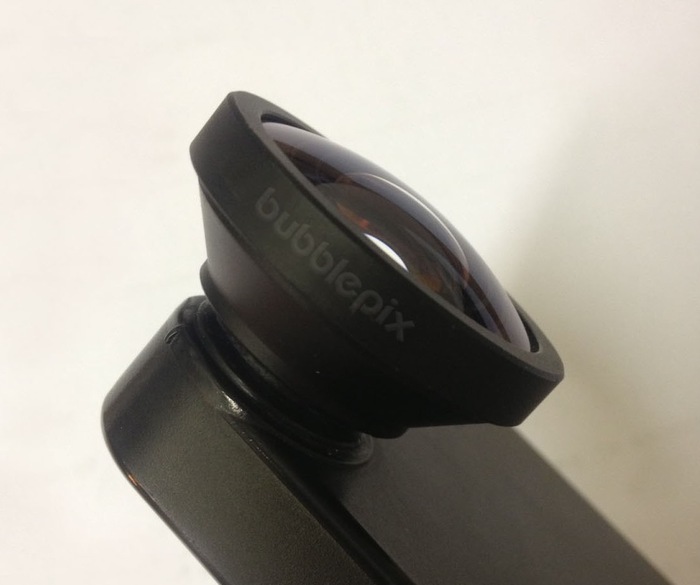
Our BubblePod Pro Pack wide-angle lens option
Their BubblePod Pro Pack wide-angle lens option
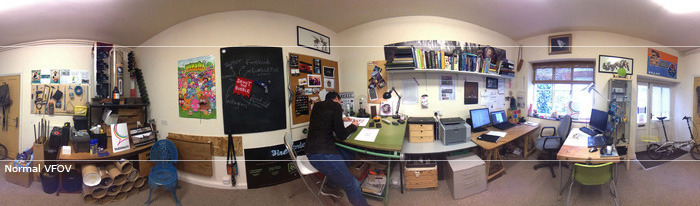
The standard BubblePod captures approximately 60º Vertical Field Of View because that is the Vertical Field of View (VFOV) for your smartphone’s camera. So you get a 360º x 60º image. But sometimes you need a bit more that that so we’ve developed our own custom wide-angle lens that increases the field of view of your smartphone to 120º. That means that not only do you get a full 360º image as the BubblePod rotates but you double the VFOV too. 360º x 120º. There’s not much that you’ll miss now!


Anyone for a slightly large VFOV? (click to view immersively full screen)
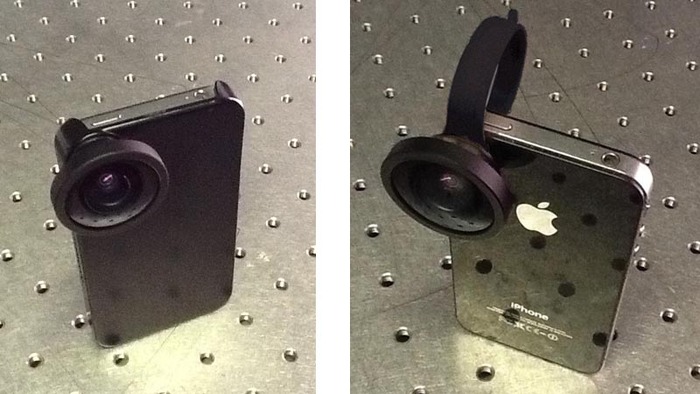
It is perfect for capturing smaller indoor spaces or just getting an even fuller picture than before. Our lens is supplied in our BubblePod Pro pack with a universal clip that means you can quickly and easily attach it to a variety of smartphones. It also comes with the same bayonet connection as our BubbleScope, so if you have a BubbleScope or BubbleScope case (available separately) you can simply use it to connect your wide-angle lens. Easy! If you’d like more details on the wide-angle lens check out update 6 as this was a stretch goal we made available after we reached our funding target. 


Connect our wide-angle lens using either our smartphone case (supplied with our BubbleScope) or a universal clip (supplied in our BubblePod Pro Pack).
Connect their wide-angle lens using either our smartphone case (supplied with our BubbleScope) or a universal clip (supplied in our BubblePod Pro Pack).

abril 16, 2014

In 5-10 years, how will people get things done at work, at home, and on the go

marzo 04, 2014

Five future transportation technologies that will actually happen


  • Elon Musk
Just when you thought your commute was getting too routine.
Over the next decade, the idea of getting to work on time, heading out to the hinterlands for your family vacation or even going to the game will become much easier. Cars will drive themselves along pre-determined routes. Trains will use new magnetic rail systems. And an amazing new “hyperloop” train will speed along at 800 miles per hour.
The best part? These innovations are not just spinning their wheels. They are set to debut within the next 10 years or have already started transporting us.
“New technologies have the potential to make our roads and transit systems safer, greener and more efficient,” Gregory Winfree, the administrator of the Department of Transportation’s Research and Innovative Technology Administration, told FoxNews.com. “We are working hard to ensure that these technologies can be integrated safely into our existing system.”
“We will need to do something,” said Thilo Koslowski, the lead automotive analyst at research firm Gartner, who studies next-generation transportation, “given that we will continue to see more vehicles on the road but won’t be able to grow infrastructure at the same time. We have to get smarter about using that infrastructure and/or innovate in passenger vehicles and mobility.”
  • 1. Hyperloop


    Elon Musk
    One of the most exciting innovations in transportation has to be the Hyperloop train. Rising on nearly airless tubes at 800 mph, the train will transport you from LA to San Francisco in just 30 minutes. Elon Musk announced a design scheme back in August, but FoxNews.com has learned the concept is more than a pipe dream -- it is now a real technology in development.
    “We’re moving toward conceptual design,” said Dr. Patricia Galloway, the co-leader of Hyperloop Transportation Technologies Inc., hinting at more than just a rough design sketch and an actual concept, something that is concrete and verifiable in the near future.
    “On paper, hyperloop is both cheaper and quieter, and it is potentially much faster, than a maglev train,” said Rob Enderle, an analyst with Enderle Group who studies Silicon Valley technology. 
  • 2. Maglev trains


    Wikipedia / Yosemite
    “Magnetic levitation” trains are not just a lofty dream held over from the ’50s. They are already in operation in Shanghai and Japan. South Korea is building a maglev train that will operate within the Incheon Airport, and China reportedly has a second maglev train in development.
    A magnetic force lifts and propels the train using a minimal amount of energy compared to diesel-powered or electric-powered trains. The trains whisk passengers along at up to 310 miles per hour. A planned maglev train will transport passengers over 200 miles between Nagoya and Tokyo in just 40 minutes, helping to free congested roads, reduce air pollution, and reduce accidents.
    Of course, the main issue with maglev trains is the high cost of development. Because of the fast speeds, the trains have to be routed directly between destinations, said Enderle.
  • 3. Autonomous vehicles


    YouTube / Google
    A robotic driver can think faster and smarter than a human driver -- and look in all directions at once. That’s the idea behind autonomous driving, where you take your hands off the wheel and let the car do the driving for you. Ford has already announced a project called Traffic Jam Assist and Cadillac is working on something called Super Cruise that lets the car take over.
    Still, Google is leading the charge. It now uses a fleet of about 24 Lexus RX450h vehicles that have logged a total of about 500,000 miles on California roads. The cars can look for exit ramps, detect buildings, stop suddenly for other cars and change speeds as needed.
    Enderle says there are many prototypes already on the road, especially those being tested by Google in San Francisco. Nevada has already created laws that make them legal to use in cities, including Las Vegas. In fact, Enderle says autonomous driving could appear within two years if it weren’t for some nagging legal issues (such as how to insure them) and public safety concerns.
  • 4. Smart cars


    BMW
    One way to solve transportation problems in major cities is to make the cars much smaller and smarter. So-called “smart cars” have been around for many years. But there are signs of progress. Many automakers, including BMW and Nissan. already offer compact electric cars. The BMW i3, already available in Europe, can brake automatically when you take your foot off the accelerator, consumes no gasoline and operates for 80-100 miles per charge.
    “I do believe that there is a growing opportunity for new types of vehicles specifically designed for urban areas,” Koslowski said, adding that these cars need more of a “wow” factor and will have to become part of an urban area’s overall plan for better transportation in a city, not just showy small cars for individual drivers.
  • 5. Urban transport pods


    Transport Systems Catapult
    What if you could jump into a moving pod and speed away to another part of the city? That is what the Milton Keynes neighborhood about 45 miles northwest of London is planning. The pods seat one person and move on their own over a pre-described route.
    The idea is that the human operator interacts with the pod using a touchscreen in the windshield. You swipe to select a destination, and you can read the daily news, check your e-mail or even play a video game during the trip. There will be a built-in wireless hotspot to connect your gadgets. The pod operates on its own, showing its current route.
    (Similar pods are already being used in Masdar City in Abu Dhabi and at the London Heathrow airport, but both are used in tightly controlled areas.)
    Jon Beasley, the program director at Transport Systems Catapult who is charged with developing the technology, told FoxNews.com the project is an “urban laboratory” where they can test not just the autonomous pods but also how they work in a real public setting.
    “We want to gain familiarity with future transport solutions in one area, to make it easier for industrial collaborators to come together and work together,” he says.

enero 15, 2014

10 must-have Android camera and photo apps

Posted: , by Victor H.
10 must-have Android camera and photo apps
A smartphone nowadays can easily replace a point and shoot dedicated camera not just because of the fact that the best camera is the one you have with you, but also because image quality has improved so much in the last few years. With a good image to begin with, the versatility of having an application store for quick and easy editing and always-on data connectivity for sharing smartphone photography is becoming more than just a hobby.

However, as good as most built-in camera applications are, they have their issues. The Nexus 5 camera has a limited viewfinder that does not show a real view of what’s being recorded and has a terrible panorama mode (just as the Xperia Z1’s stock camera app). The HTC One has all its neat options hidden deep in menus. The list of flaws goes on and on.

All these are shortcomings that you can fix on a smartphone camera, though, with a simple app download. To help you with getting just the best camera apps and not wasting time with the ones that aren’t good, we have carefully hand-picked only the best, the essential Android camera apps. With them, you’d be able to take your photography to the next level, and probably do a little better than your the average Instagram dweller (hey, Instagram is not on this list, but you already know about it, don’t you?).

So with no further ado, here is our selection of the best Android camera apps, take a look.


STORY TIMELINE

noviembre 18, 2013

Pantallas curvas, flexibles o plegables ¿hacía dónde vamos?

17 DE NOVIEMBRE DE 2013, 15:15
pantallas plegables
No cabe duda de que estamos vivido una revolución en lo que a formatos de pantalla se refiere. Las compañías tecnológicas siguen innovando en cuanto a densidad de píxeles se refiere, algo que no tiene mucho sentido como ya vimos, pero también en cuanto a tipos de pantallanaciendo cada año nuevos modelos con un destino claro, ser fácilmente moldeables a nuestros gustos.
Las pantallas no siempre han sido planas, un concepto básico de lo que es una superficie a través de la cual vemos imágenes a menudo erróneo, sin ir más lejos los primeros televisores tenían pantallas con forma de parábola. A partir de ahí el estándar se fue encaminando hacia lo recto, liso u homogéneo alrededor de toda la superficie de visión. Pero en los últimos años la cosa ha ido cambiando, el futuro según las compañías electrónicas pasa por pantallas curvas, flexibles o plegables finalmente que permitan desarrollar nuevos tipos de dispositivos nunca vistos antes.

Pantallas curvadas - Una nueva era de visualización

A principios de este año durante el CES 2013, compañías como Samsung o LG decidieron presentar los primeros televisores OLED curvos del mercado. Este tipo de pantallas pretenden hacernos sentir en casa como si estuviéramos en un cine IMAX ofreciéndonos una experiencia de visualización más panorámica e inmersiva mientras se mejoran los ángulos de visión cuando nos moviéramos.
Además, la distancia desde cualquier punto del televisor hasta nuestros ojos será la misma gracias al ángulo de curvatura de 5° que tiene el dispositivo.
pantallas plegables
Tras la aparición de los primeros televisores curvos, les tocó el turno a los smartphones. Casualmente las mismas tecnologías Samsung y LG, firmes en su apuesta por este tipo de tecnologías, presentaron sus primeros dispositivos móviles con pantalla curva.
La diferenciación más importante que podemos encontrar en este tipo de dispositivos móviles, a parte del diseño que te puede gustar o no, es la mejora de la autonomía. Las pantallas curvadas cuentan con una visibilidad bajo la luz solar mucho mejor que las pantallas actuales, pues reflejan muchísimos menos rayos de luz, por lo tanto, ya no será necesario elevar al máximo el brillo de nuestra pantalla cuando estamos en el exterior reduciendo así el consumo de batería.

Pantallas flexibles - Consolidación de la tecnología

El paso lógico tras las pantallas curvas en los dispositivos electrónicos será la aparición de las primeras pantallas flexibles. De nuevo nos encontramos con Samsung y LG, aunque en esta lucha por hacerse con una cuota de estos nuevos mercados también se mete HP.
Stephen Woo, presidente de Samsung, anunció durante el CES 2013 junto con Brian Berkeley, vicepresidente de Samsung Display, la nueva tecnología de pantalla flexibles fabricadas de plástico conocida como Youm.
pantallas plegables
Las ventajas de este tipo de pantallas no están aún muy claras, principalmente debido a que esta tecnología está todavía demasiado adelantada a nuestros tiempos y no nos podemos hacer mucha idea de como podría evolucionar la tecnología que las rodea en unos años. En principio al ser pantallas de plástico nos ahorraríamos muchos sustos de roturas o picotazos en el cristal tradicional.
Sin embargo lo más atractivo sería la aparición de dispositivos completamente diferentes a como los conocemos hoy en día, si bien las pantallas flexibles se pueden moldear según nuestros gustos, el hardware que las sustenta, batería, cámara, memoria, botones físicos o chasis no se podría enrollar o hacer flexible si queremos que sea duradera, al menos con las tecnologías que conocemos a día de hoy.
Como veremos a continuación, el futuro pasará por crear un dispositivo completamente flexible, aunque no tenemos la respuesta de cómo lo podrán hacer las compañías. Será muy interesante ir viendo como evoluciona esta tecnología tan innovadora.

Pantallas plegables - El futuro en nuestras manos

Como ya aventuró el equipo de Microsoft Research, los investigadores de la compañía estadounidense, en un increíble vídeo promocional, el futuro de los dispositivos electrónicos, smartphones, tablets, televisores se encaminaba a las pantallas plegables, el último paso en esta carrera por la innovación.
La perspectiva del video de Microsoft se centraba en cómo podían ser nuestros hogares en la próxima década aunque parece que la tecnología ha avanzado más rápido de lo que esperábamos todos, incluso los más futuristas. Sin ir más lejos, la semana pasada se descubrió gracias a una importante filtración que de nuevo Samsung, estaba preparando pantallas plegables con resolución 4K para el2015, una auténtica locura en cuanto a innovación se refiere.
Sin duda, si estas pensando en renovar todos los equipos de tu casa, te aconsejo que esperes a esta fecha, vayas ahorrando dinero desde ahora, porque este si que va a ser el salto más importante de lo que llevaremos del siglo XXI.
Cada vez las resoluciones 4K nos resultan más familiares, sin embargo actualmente sólo las podemos encontrar en algunos televisores o tablets con precios desorbitados y sin sentido, pues los contenidos televisivos están aún muy lejos de adaptarse a este estándar. Sin embargo, ver la pantalla de 5" en un teléfono con resolución 4K marcaria seguramente nuestra manera de ver las cosas.
Si mezclamos esta tecnología de píxeles con la posibilidad de doblar o plegar todo un dispositivo por completo según nuestras necesidades, nos adentraremos en un mundo difícilmente imaginable donde todas las cosas según las conocemos cambiarían de forma radical haciendo mucho más fácil nuestra vida diaria.